(8 min. read)

What Is Google AI Mode?
Artificial intelligence is playing an increasingly important role in internet search engines, which have been leveraging its capabilities for quite some time now. In June 2025, Elizabeth Reid, VP of Google, shared the following observation (Semafor):
We are in the AI search era, and have been for a little bit.
These words highlight that we are living in the age of AI-powered search, and this shift is not entirely new...
Google AI Mode is a dedicated, distinct way to find the information you need. To support it, Google introduced a separate tab located directly below the search bar, on the left side.

In May 2026, monthly active users of Google's AI Mode exceeded 1 billion (Google Blog).
Traditional search is far less advanced. A user types in a query, and Google generates a list of websites (with links to them). Now, users can switch to AI Mode and start a conversation about what they currently need.
Let's look at an example. Suppose you want to buy hiking boots in the near future. You can turn on AI Mode and describe what you are looking for. Based on data collected from across the web, Google AI Mode will generate tailored search results for you.
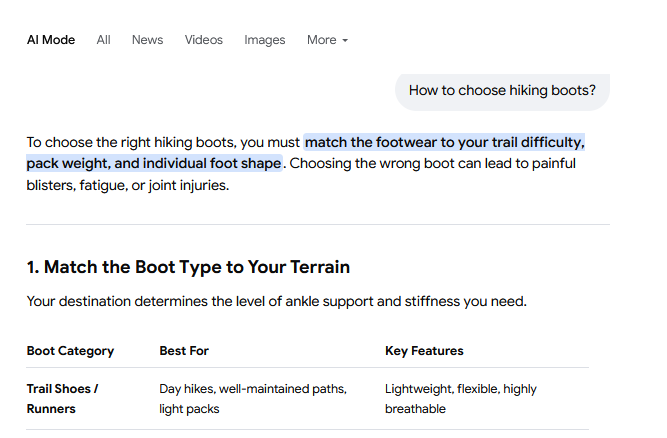
With standard search, you mainly get a list of links. You then have to browse through them step by step and manually filter out the most relevant information. Google AI Mode does all that heavy lifting for you.
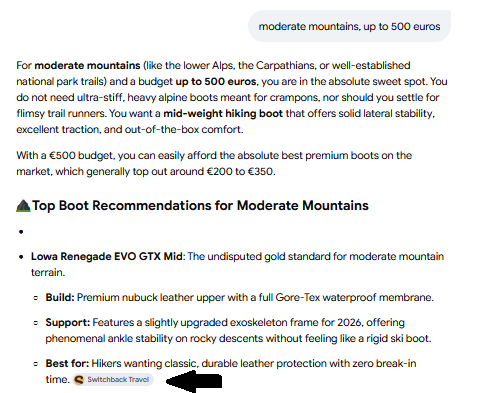
Importantly, you can quickly refine your request. Imagine standing in a store and talking to a shop assistant. You can specify exactly what matters most to you, making your final decision much easier. That's because Google AI Mode doesn't just generate information on a given topic, it also instantly provides links to websites you might find relevant.
In AI Mode, you can ask questions using text, voice, or even images. For the purpose of this article, I generated an AI image of a blazer stained with coffee. Suppose you want to quickly figure out how to wash it out...
You can simply open Google AI Mode, attach the image (by clicking +), and describe the issue.

Here is a snippet of the answer we received:

Google AI Mode autonomously gathers information while linking to relevant websites where you can dive deeper into the topic.
*However, it's worth noting that AI can make mistakes. Therefore, it's good practice to double-check critical information across multiple sources.
Where Is Google AI Mode Available and How to Enable It?
AI Mode is available across multiple continents (Support Google):
- Europe (e.g., France, Germany, Poland)
- Asia (e.g., Japan, Vietnam, South Korea)
- North America (e.g., Canada, USA, Mexico)
- South America (e.g., Brazil, Argentina, Bolivia)
- Australia &
Oceania (e.g., Australia, New Zealand, Fiji) - Africa (e.g., Algeria, Benin, Cameroon)
In total, it covers over 200 countries (Blog Google).
If you aren't using Google AI Mode yet, you can enable it in 3 ways:
- Go to https://
www.google.com/ ai - Visit https://
www.google.com, type your query into the search bar, and click "AI Mode" - Tap "AI Mode" on the home screen of the Google app
To use this modern search interface, you must be logged into your Google Account
Google AI Mode vs. AI Overviews – Key Differences
Google AI Overviews are short summaries of the most important information, generated directly from a search query.
Suppose you keep hearing the word “GOAT”, but you have no idea what it means. You can type it into the search box, and Google will display a quick summary right at the top.
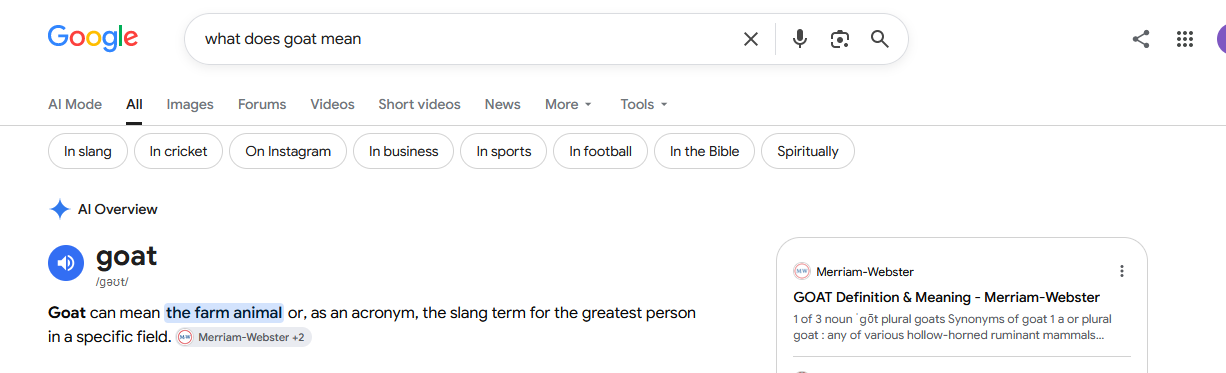
Notice the difference compared to traditional search below. If you type "how to choose running shoes", at the very top you will see sponsored products, followed by sponsored search results (which you can hide), and only then organic links to relevant pages. You still have to visit them and extract key insights on your own.

It's also worth noting that AI Overviews only appear when Google's systems determine they add value to the standard search experience. As a result, they aren't generated for every query.
What are the core differences between Google AI Mode and AI Overviews?
- Where they operate
- How information is retrieved
- Monthly user base
To trigger Google AI Mode, you enter a query and click the "AI Mode" tab, which redirects you to a separate, dedicated interface where you can refine details through follow-ups.
Google AI Overviews, on the other hand, trigger automatically on the standard search results page. AI Mode enables a full conversational flow to pull out the most useful facts on a topic, whereas AI Overviews serve as a brief overview with a few source links.
However, the line between AI Overviews and AI Mode is gradually blurring. Google now allows users to ask follow-up questions directly within AI Overviews and seamlessly transition into an AI Mode conversation without losing search context. This makes the search journey far more conversational, turning a single query into a series of increasingly detailed questions.
According to SEO expert Nadia Mohamed, Google AI Overviews reaches 2.5 billion monthly active users, while Google AI Mode accounts for over 1 billion (blog). These features are becoming increasingly popular.
The number of queries in AI Mode has doubled every quarter since its launch in May 2025.
Additionally, AI Mode and AI Overviews rely on different models and techniques, meaning the responses and source links provided by each feature may vary.
The Rise of Google AI Mode – What Does It Mean for SEO?
Website owners and publishers cannot afford to ignore these shifts. Recent research indicates that by 2028, AI-driven search engine users will outnumber those relying on traditional search methods (Search Engine Land).
The fundamental shift lies in how information is presented. Instead of a plain list of web links, users now get:
- Quick summaries (Google AI Overviews)
- Interactive multi-turn dialogues (Google AI Mode)
In both cases, Google cites and links back to the most relevant websites and site owners should strive to be featured there.
While this may come as a surprise to many... not that much has actually changed in practice. Proven SEO practices that were previously recommended remain just as vital today (Google Search Central):
Core SEO best practices still apply because our generative AI search features build upon our foundational ranking and quality systems.
Aleyda Solis, an international SEO &
Google’s new guidance for optimizing for AI experiences makes it clear: SEO principles still apply in AI Search.
Google AI Mode SEO – How to Optimize Your Site for AI Search?
Here are Google's core recommendations for AI search optimization:
- Publish unique, high-value content
- Maintain a clean, logical technical structure
- Build a strong internal linking network
- Ensure full mobile optimization
- Include high-quality images and videos
- Utilize semantic HTML tags wherever possible
It is equally important to build brand authority and secure coverage across reputable external sources. You can achieve this through backlinks from relevant niche sites, unlinked contextual brand mentions, and PR placements in reputable publications.
Want to boost brand's visibility in AI?
Publish articles and earn high-authority backlinks on top-tier publications with WhitePress®!
How to Create Unique, High-Value Content?
- Focus on E-E-A-T (Experience, Expertise, Authoritativeness, Trustworthiness): Base your content on first-hand experience and deep subject knowledge. Google rewards content created by industry experts who offer fresh, original perspectives -avoid simply rehashing existing articles found online.
- Answer real user intent: Think about what the user actually wants to learn. The more specific and detailed your insights, the better. Ditch corporate jargon in favor of clear, natural language.
- Structure for readability: Outline your content before writing to ensure a logical flow. Avoid wall-of-text paragraphs and use bullet points instead. Modern users tend to scan pages, so make key information easy to digest.
Optimize Content for Query Fan-Out
"Query fan-out" is a critical technique utilized by both AI Mode and AI Overviews. How does it work?
The system expands a user's initial query into multiple related sub-queries targeting underlying topics and data sources. As it generates the answer, it evaluates a broader pool of websites covering various angles of the topic. Ultimately, this surfaces a much more diverse set of relevant links compared to traditional keyword matching.
From an SEO perspective, you need to look beyond target keywords. Your content should address related sub-topics, follow-up questions, and underlying needs that might arise as users dig deeper.
How to Track Website Visibility in Google AI Mode?
As of August 31, 2026, Google offers a Generative AI Performance Report in Google Search Console. This report covers site impressions across both AI Overviews and AI Mode, allowing you to analyze total impressions, top-performing pages in generative features, and breakdown metrics by country and device.
You can also monitor AI Mode visibility using third-party tools such as Ahrefs Brand Radar or Semrush AI Visibility Toolkit. These tools reveal which prompts feature your brand, which URLs are cited as sources, and how your visibility trends over time. Keep in mind, however, that third-party platforms rely on modeled query sets rather than total real-user traffic data.
Summary
AI-powered search is no longer a future trend, it's today's reality. Website owners cannot afford to ignore it.
The good news is that foundational SEO strategies still work. There is no need to discard your existing playbook.
To rank in Google AI Mode and AI Overviews, focus heavily on publishing authoritative, highly practical content. Bring unique insights backed by hands-on experience to the table instead of echoing what is already on the web.
AI search adoption will only continue to accelerate, gradually replacing traditional workflows. Google is investing heavily in this space, regularly rolling out new features. Moving forward, expect AI Overviews to become even more precise, and AI Mode to become increasingly multimodal, conversational, and integrated into everyday search.