(11 min. read)
What Is Google Discover?
Google Discover was launched in 2018. It is a personalized feed featuring articles, news, and other types of content that users mainly see in the Google app and on the Google homepage on mobile devices. Using advanced algorithms, Google analyzes factors such as user interests, browsing activity, location, and followed topics, then selects content that may appeal to them at a given moment.
Users do not enter a search query, compare results on the SERP, or choose from a list of links. Instead, content appears in a personalized feed before they even start looking for it. The more Google services we use, the better Discover becomes at tailoring recommendations. Over time, Google’s algorithms refine the recommendation system based on user engagement.
Google Discover vs. Traditional Search
The biggest difference between the Google Discover feed and the traditional search engine is the lack of a search query. In standard search, users type in a phrase and expect a direct answer. In Discover, Google suggests content before a specific question even arises. That’s why Discover does not work like a ranking system for specific keywords. Instead, it functions more like a recommendation engine tailored to individual interests.
Google Discover vs. Google News
Discover is also different from Google News. Google News is a separate service focused on news content. Users can browse top headlines, search for stories within selected categories, and customize sections according to their preferences.
Discover may display news stories, but it is not limited to them. The feed can include guides, analyses, evergreen content, lifestyle articles, expert commentary, videos, and other formats - provided they match user interests. For website owners, this creates broad opportunities, but also introduces more unpredictability than standard SEO.
Google Discover: How to Turn It On and Off
Google Discover is available through the settings in the Google app. It is usually enabled by default on Android devices. In most cases, users can access it by swiping right on the phone’s home screen or by opening the Google app. On iPhones, the Discover feed is available within the app after signing into a Google account.
To enable Google Discover:
- Open the Google app,
- Tap your profile picture or account icon in the upper-right corner,
- Go to Settings,
- Select General,
- Turn Discover on or off.
If you want to turn off Google Discover, follow the same steps. You can also customize the topics shown in your feed by tapping the three-dot icon on any post and selecting options such as “Interested in this” or “Not interested.”
How Does Google Choose Content for Discover?
For content to appear in Google Discover, it must first be indexed by Google and comply with Google Search content policies. There is no need to add a special tag, implement separate structured data specifically for Discover, or manually submit a page to the platform. However, indexing alone does not guarantee visibility in the feed.
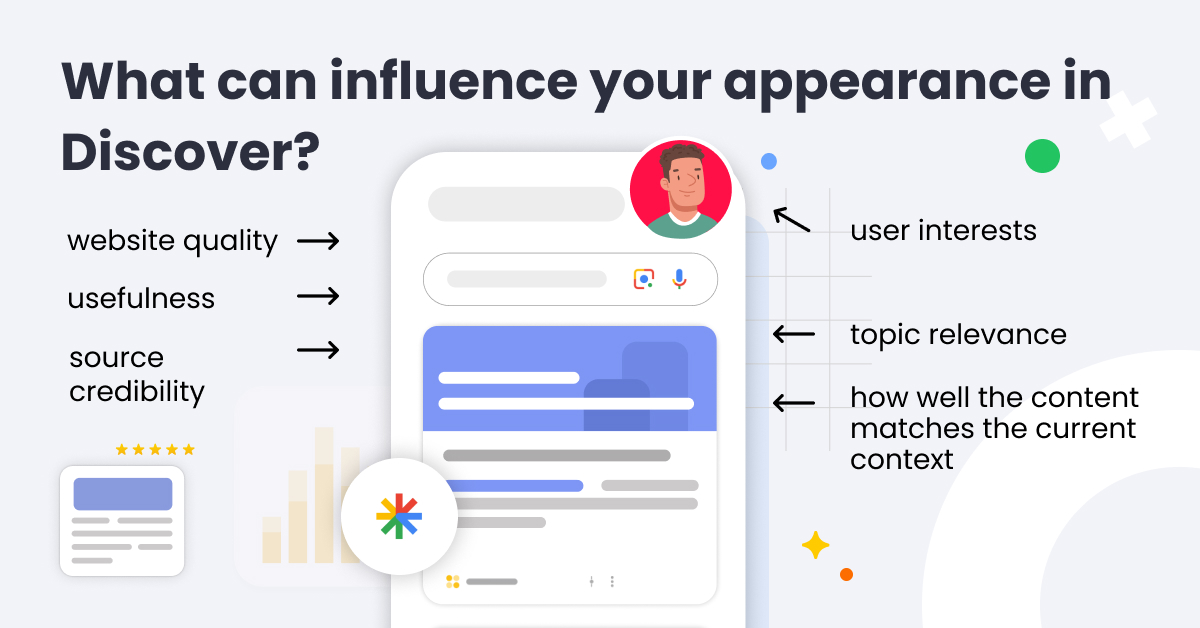
Google uses many factors when selecting content to display. It evaluates website quality, topic relevance, usefulness, source credibility, user interests, and how well the content matches the current context. Discover relies on Google Search systems, but it does not rank pages for a single keyword. The same article may be shown to one group of users while being completely ignored by another. Because of that, you cannot “set a position” in Discover the same way you would in traditional SEO. Still, you can prepare content in ways that increase its recommendation potential.
What Increases Your Chances of Appearing in Google Discover?
Valuable and Trustworthy Content
Appearing in Google Discover requires a comprehensive approach. The foundation is content that offers more than recycled information already available on dozens of websites. Google pays attention to helpfulness, reliability, and the author’s experience. A clear heading structure and logical organization also matter.
An article has greater potential if it addresses a specific audience interest and provides a clear benefit to the reader. For example, it may:
- explain a new phenomenon,
- simplify a complex topic,
- comment on a current industry change,
- expand on a subject that is gaining popularity.
The key is to avoid making the article feel like it was created solely to capitalize on a temporary trend.
How can you strengthen trust signals? Author bylines, short author bios, reliable data sources, update dates, and overall website consistency all help. Discover can generate sudden traffic spikes, but it usually favors websites that Google considers trustworthy within a given topic area.
Topics Aligned With User Interests
The Discover feed is more likely to display content that combines timeliness with genuine user interest and reflects individual preferences. This does not mean only news content can succeed. A guide or evergreen article may gain visibility if it covers a topic currently returning to industry discussions, becoming seasonally relevant, or addressing recurring audience needs.
For SEO specialists and publishers, data-driven content planning is essential. Useful sources include Google Trends, Search Console data, social media insights, newsletters, and internal analytics systems. It is worth monitoring which topics are gaining momentum and which are losing relevance.
Besides matching content to audience interests, having a clear perspective is also valuable. Instead of publishing another generic article about a popular trend, it is often more effective to show its impact on a specific target audience.
Comment

John Shehata
Founder of NewzDash
Discover is the clearest test of editorial judgment in search. There is no query to react to and no ranking to game. Google is asking whether you can identify a topic your audience cares about before they think to search for it. Most teams are still organizing their newsroom around keywords. The publishers gaining ground in Discover have rebuilt their planning around content entities, and audience interest signals, with search demand as confirmation rather than the starting point.
Headlines That Encourage Clicks Without Misleading Users
In Discover, headlines play a huge role because users make quick decisions while scrolling through the feed. That does not mean clickbait is the right strategy. Google explicitly discourages sensational headlines, exaggerated claims, and titles that promise more than the article actually delivers.
A good headline should clearly communicate the topic and explain why the article is worth reading. For example, “How to Check Whether a Traffic Drop Was Caused by a Google Update” works better than “Google Changed the Algorithm. Your Website Could Be at Risk!”
The same rule applies to the introduction. The opening sentences should quickly introduce the topic and explain what readers will gain from the article. In Discover, users often click impulsively, so the content must immediately confirm that the click was worthwhile in order to reduce bounce rates.
Large, High-Quality Images
Visual presentation is equally important in Google Discover. Google recommends using large images, ideally at least 1200 pixels wide. The website should also use the max-image-preview:large setting within the robots meta tag in the page’s <head> section, typically configured globally in article templates or through an SEO plugin in the CMS. This allows Google to display larger image previews in the feed. Proper og:image implementation also matters, as it defines the main preview image shown alongside the content.
The image should relate directly to the topic and encourage clicks without relying on cheap sensationalism. Ideally, the graphic should:
- reinforce the article’s main idea,
- help users quickly understand the context,
- communicate something that the title alone cannot fully convey,
- reflect the character of the content without misleading readers,
- avoid generic stock photos or brand logos alone,
- include descriptive alt text.
Technical Accessibility
Discover does not require separate technical setup, but the website must remain accessible to Google. Since Discover is primarily mobile-focused, User Experience on smartphones is extremely important. Always check whether:
- the article can be indexed,
- robots.txt is not blocking important resources,
- the canonical tag points to the correct URL,
- the page loads quickly on mobile devices,
- ads, pop-ups, and intrusive elements do not interfere with reading.
What should you avoid? Following Google Discover best practices also means avoiding artificial publication date updates without real content improvements. If the article has been expanded with new information, commentary, or developments, updating it makes sense. If only the date changes, there is little value for the user.
Common Myths About Google Discover
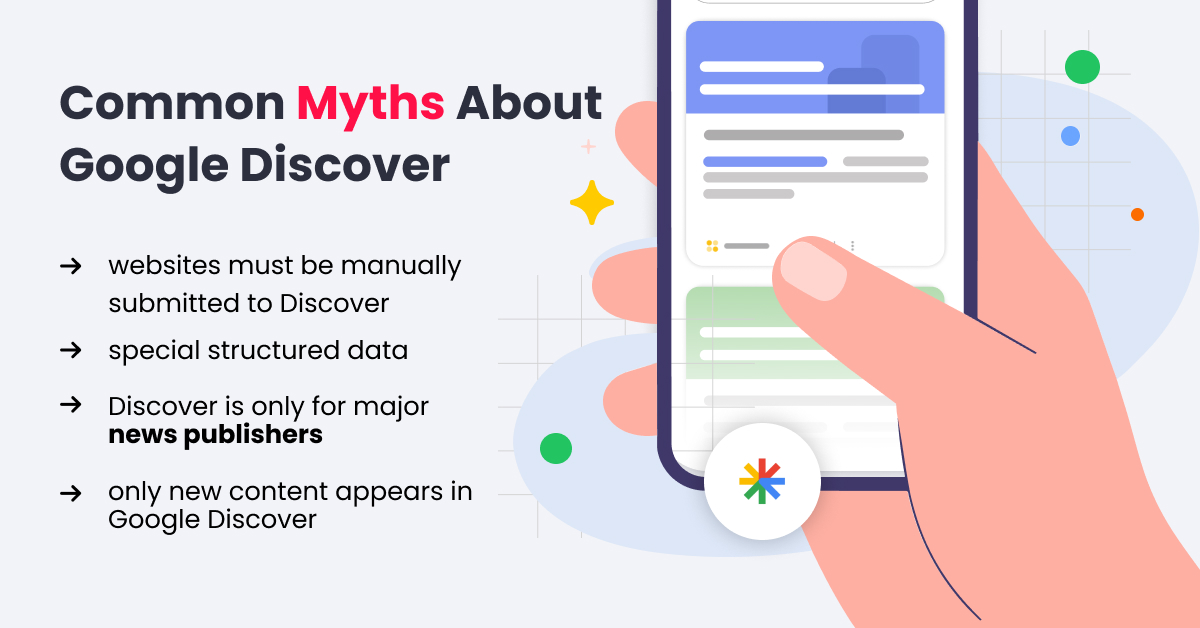
The first myth is that websites must be manually submitted to Discover. In reality, Google automatically evaluates indexed content as long as it meets the platform’s requirements and policies.
The second myth concerns special structured data. Schema markup may help Google understand a website better in a broader SEO context, but there is no dedicated tag that guarantees visibility in Discover.
The third myth is that Discover is only for major news publishers. Large media outlets may benefit from stronger brand recognition and authority, but smaller websites can also appear in the feed if their content matches user interests and comes from a trustworthy source.
The fourth myth is that only new content appears in Google Discover. Timely topics certainly help, but publication date alone does not determine visibility. Google may also display older articles if they remain useful and relevant to user interests.
How to Measure Results From Google Discover
The main source of Google Discover Traffic data is the Discover report in Google Search Console. There, you can check clicks, impressions, CTR, top-performing URLs, countries, and performance trends over time. The report only becomes available after a website reaches a certain impression threshold - though Google does not reveal what that threshold is - so smaller websites may not see it immediately.
Comment
.png)
Dominik Fajferek
Head of SEO @SEM House
The Discover report is available only for pages that have actually appeared in the feed. This is important to know, as many owners of smaller or newer websites get frustrated when they do not see this data. The absence of the report does not mean there is a technical issue. So if you do not see it in your Google Search Console, do not panic. Instead, focus on optimizing your content for Discover, and treat the data in GSC as a reward and a useful guide for the future once it appears.
It is also worth noting that while GSC is the main source of truth, you can also try to track Discover traffic in Google Analytics, for example by looking at referral traffic from googleapis.com, android-app://
Monitoring performance is essential, but while analyzing data, remember that Discover is more volatile than traditional search. Traffic may surge after publishing one article and then quickly decline. This does not always indicate a technical issue or quality drop. It is worth checking whether:
- the topic has lost relevance,
- competing articles have started attracting more attention,
- Google tested the content only among a limited audience,
- CTR dropped because of a weaker headline or image,
- users actually engage with the content after clicking.
The best approach is to analyze Discover from several angles: which topics generate traffic, which headlines achieve strong CTRs, and which image formats perform best. Clicks alone matter, but without evaluating traffic quality, it is easy to overestimate a temporary visibility spike.
Tools That Support Google Discover SEO
There is no single perfect tool that guarantees visibility in Discover, but the following can support your Google Discover SEO strategy:
Google Search Console (GSC)
This is the primary source of Discover traffic data. It shows clicks, impressions, CTR, and URLs that appeared in the feed. It should always be the starting point because the data comes directly from Google.
Google Trends
Google Trends helps identify topics gaining popularity in specific countries and languages. It is especially useful when planning seasonal, news-related, or evergreen content for multiple markets.
NewzDash
This tool is designed for publishers and editorial teams working with news SEO. NewzDash monitors publisher visibility across Google Search, Top Stories, Google News, and Google Discover. It tracks trends, competitors, and content performance in near real time. Its Discover module allows users to analyze trending stories, domains, content categories, and Discover trends.
Marfeel Discover Monitoring
A useful solution for larger publishers that want deeper insights into Discover visibility, trending content, and the types of articles gaining traction in the feed.
Chartbeat or Parse.ly
These analytics tools support editorial and content teams by showing how users interact with articles after clicking, which content drives engagement, and how Discover compares with other traffic sources.
Google Discover Starts With Understanding Your Audience
Google Discover does not guarantee visibility. There is no submission form and no simple setting that automatically increases traffic. What it does reveal, however, is whether a brand or publisher truly understands its audience.
Here, it is not enough to answer existing search queries. The best approach to SEO for Google Discover combines SEO expertise, editorial quality, and data analysis. You need to anticipate what may interest users before they actively search for it. That is why valuable content created for real readers - rather than purely for algorithms - has the greatest advantage.